Tech & Gadgets · July 31, 2026
Quality USB-C Accessories for a Simpler, Smarter Tech Setup
A minimalist guide to choosing quality USB-C accessories that reduce clutter, improve daily workflow, and help you buy only what you truly need.
Top Picks at a Glance
| Product | Our take | Rating | Where to buy |
|---|---|---|---|
USB C Hub 5-in-1 UGREEN | Editor's Pick | — | |
USB C Hub 7-in-2 Anker | — | — | |
USB C Hub BENFEI | — | — | |
USB C to USB Adapter Apple | — | — | |
Portable SSD T7 Samsung | — | — |
This post contains affiliate links — we may earn a commission. See full details ↓
Minimalism is not about owning the fewest things possible. It is about owning the right things: useful, reliable, and easy to live with. In a tech setup, that often means choosing accessories that quietly solve problems without creating a drawer full of cables, dongles, and almost-useful adapters.
USB-C is one of the best examples of modern minimalism in action. One small port can charge your laptop, connect a display, transfer photos, power a tablet, or back up your files. But the accessory market is crowded, and not every shiny hub or adapter deserves space in your bag.
The minimalist goal is simple: buy fewer USB-C accessories, but make each one earn its place.
Why Quality USB-C Accessories Matter
A cheap USB-C accessory can look almost identical to a better one, but the difference often shows up in daily use. A good hub feels stable, stays connected, manages heat reasonably well, and gives you the ports you actually need. A poor one may disconnect your drive, flicker your monitor, or become one more thing you stop trusting.
For a minimalist lifestyle, reliability is part of simplicity. The less you need to troubleshoot, replace, or carry as backup, the cleaner your setup becomes.
The most useful USB-C accessories usually fall into a few categories:
- USB-C hubs for connecting displays, USB-A devices, memory cards, and peripherals
- Simple adapters for one specific need, like USB-C to USB-A
- Portable storage for backups, photos, work files, and travel
- USB-C chargers that can replace multiple proprietary power bricks
Not everyone needs all of these. In fact, most people should start with one or two well-chosen accessories and stop there.
How to Choose USB-C Accessories the Minimalist Way
Before buying anything, look at your real routine rather than your imagined perfect desk. Do you connect to a monitor every day? Do you still use USB-A accessories? Do you import photos from SD cards? Do you travel with only a laptop and phone?
The right accessory is the one that removes friction from your actual life.
A simple buying checklist
- Choose one hub only if you regularly need multiple ports
- Choose one small adapter if you only need a single connection occasionally
- Choose USB-C Power Delivery support if you want charging through a hub
- Check for HDMI resolution and refresh rate if you use an external display
- Look for USB-A ports if you still use older drives, keyboards, or mice
- Consider SD or microSD card readers only if you actually use cameras or drones
- Avoid oversized docks unless your desk setup truly needs them daily
Minimalist tech works best when every port has a purpose.
Also, be careful with vague product claims. Words like universal, high-speed, and premium can be useful clues, but they are not substitutes for checking compatibility with your laptop, tablet, monitor, and charger.
Our Top Picks for a Minimalist USB-C Setup
The following accessories are strong fits for a clean, practical setup. Some are hubs that consolidate several functions into one device. Others are intentionally simple, solving one specific problem without adding bulk.
These are not about owning every possible port. They are about creating a dependable everyday kit that keeps your workspace and travel bag lighter.
UGREEN USB C Hub 5-in-1
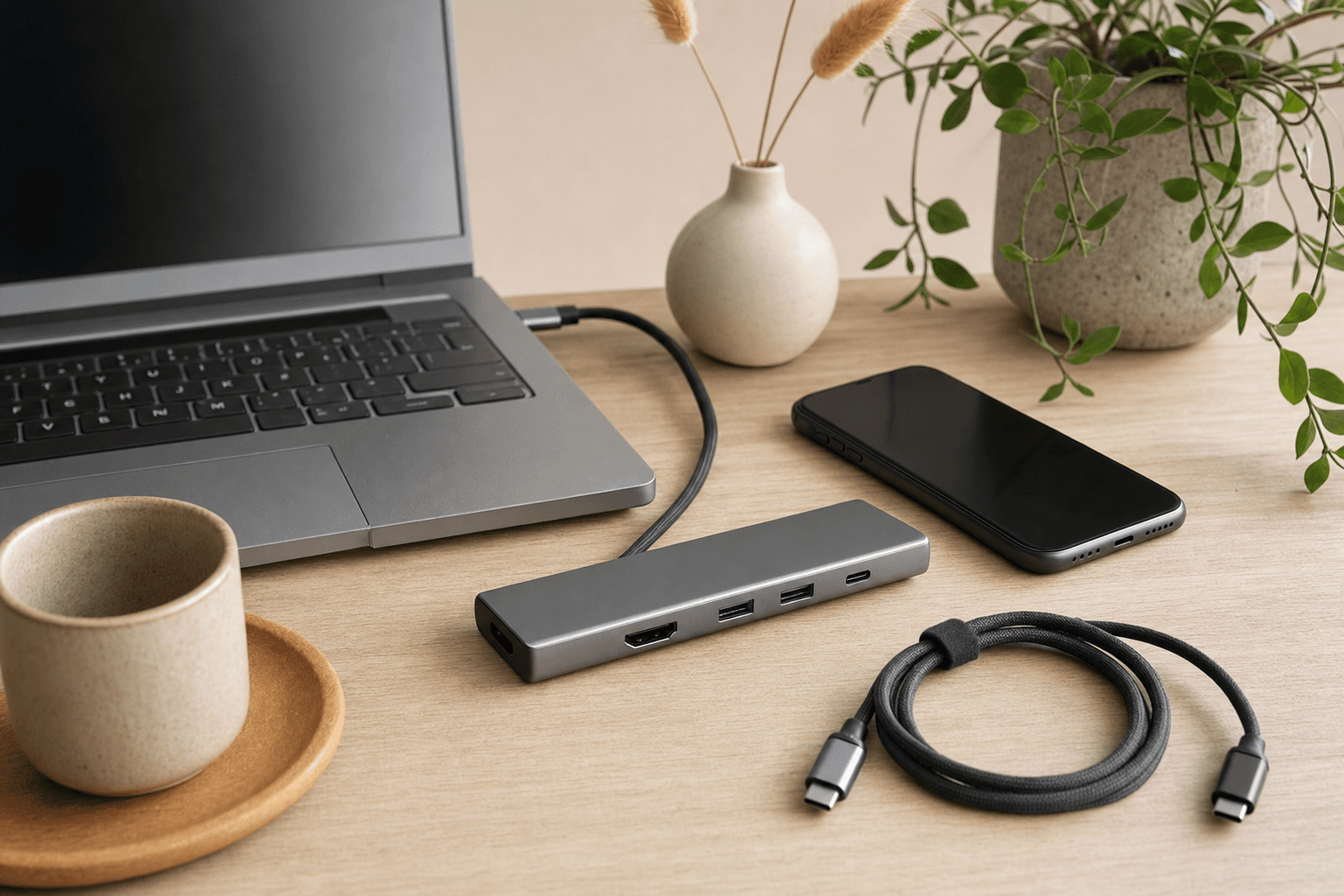
The UGREEN USB C Hub 5-in-1 is the kind of accessory that makes sense for many laptop users because it covers the basics without turning into a full docking station. It typically offers a practical mix of HDMI, USB-A, and card-reader expansion, depending on the exact version.
For a minimalist, the appeal is consolidation. Instead of carrying separate adapters for your monitor, flash drive, and memory card, one compact hub can handle the common tasks.
Best for
- Everyday laptop users
- Students and remote workers
- People who connect to a monitor occasionally
- Anyone who wants useful ports without a bulky dock
What works well
- Compact design that fits easily in a laptop sleeve or tech pouch
- Useful everyday ports rather than excessive extras
- Good value for people who need more than one connection type
- Simple desk setup with fewer individual dongles
What to consider
- Some models may not support the highest display refresh rates
- Power delivery support varies by version, so check before buying
- If you only need USB-A, this may be more hub than you need
The UGREEN 5-in-1 is a balanced choice for people who want a small, functional hub and do not want to overthink it. It is especially useful if your laptop has only USB-C ports but your daily life still includes HDMI, older USB accessories, or memory cards.
If you are buying your first USB-C hub, a compact 5-in-1 model is often the sweet spot.
Anker USB C Hub 7-in-2
The Anker USB C Hub 7-in-2 is a slim, travel-friendly hub designed for users who want more capability without committing to a full desktop dock. Anker is widely recognized for dependable charging and accessory products, which makes this a reassuring pick if reliability matters more than the absolute lowest price.
A 7-in-2 hub is especially attractive for people using slim laptops with limited ports. It can turn a minimal laptop into a more complete workstation while still keeping the setup portable.
Best for
- MacBook users with limited ports
- Frequent travelers
- Clean home-office setups
- People who want a premium-feeling hub without a large dock
What works well
- Slim profile that suits minimalist desks and travel kits
- Multiple ports in one piece for cleaner cable management
- Strong everyday practicality for displays, storage, and peripherals
- Better long-term value if you want a more refined accessory
What to consider
- It may cost more than budget hubs
- Some 7-in-2 designs are made for specific laptop layouts
- Dual-port designs may be less flexible with certain cases or devices
The Anker 7-in-2 is best for someone who knows they need a hub regularly. If you connect external storage, a monitor, and accessories several times a week, the smoother experience can be worth the extra cost.
If your needs are rare or very basic, however, you may be happier with one tiny adapter instead.
BENFEI USB C Hub
The BENFEI USB C Hub is a budget-friendly option with a simple aluminum-style design that fits well into a minimalist workspace. It is a good reminder that minimalism does not always mean buying the most expensive version. Sometimes the best choice is the simplest product that does the job reliably enough for your needs.
This hub is most appealing if you want basic expansion at a low cost. It can be a practical pick for light users who need a few extra ports but do not want to invest in a premium hub.
Best for
- Budget-conscious buyers
- Occasional hub users
- Simple home-office setups
- People who need basic port expansion
What works well
- Affordable entry point for USB-C expansion
- Clean, simple design that does not visually clutter a desk
- Useful basic ports for everyday accessories
- Good minimalist fit if your needs are modest
What to consider
- It may lack premium build quality or advanced features
- Heavy daily users may prefer a more established premium option
- Always check display output, charging support, and data speeds carefully
The honest take: the BENFEI hub is not the most luxurious choice, and it may not be the best for demanding workflows. But for basic use, it can be exactly enough.
That phrase matters in minimalist buying: exactly enough.
Apple USB C to USB Adapter
The Apple USB C to USB Adapter is refreshingly boring, and that is why it belongs on this list. It does one thing: connects a standard USB accessory to a USB-C device. No extra ports, no cable nest, no pretend workstation in your pocket.
For many people, this may be a better minimalist choice than a full hub. If you occasionally plug in a USB-A flash drive, keyboard, camera cable, or audio interface, a single compact adapter may be all you need.
Best for
- Minimalist carry kits
- MacBook and iPad users
- People who rarely need extra ports
- Anyone who wants the smallest possible solution
What works well
- Tiny and simple with no unnecessary features
- Reliable single-purpose design
- Easy to keep in a pouch, drawer, or travel bag
- Less bulky than a multi-port hub
What to consider
- It only provides one USB-A connection
- It does not solve HDMI, SD card, or charging needs
- It can feel expensive for such a simple adapter
This is the minimalist test in product form. If one adapter solves your problem, do not buy a seven-port hub just because it seems more impressive.
The best accessory is not the one with the most features. It is the one that matches your real use.
Samsung Portable SSD T7
The Samsung Portable SSD T7 is not a hub, but it may be one of the most useful USB-C accessories you can own. It is compact, fast, and easy to carry, making it a strong storage upgrade for laptops, tablets, photographers, students, and professionals.
Cloud storage is convenient, but a portable SSD still has a place in a minimalist setup. It gives you fast local backups, offline access, and a simple way to move large files without relying on internet speed.
Best for
- Backing up important files
- Photo and video storage
- Travel and remote work
- People who want fast, compact external storage
What works well
- Small footprint that slips easily into a pocket or pouch
- Fast file transfers compared with older external hard drives
- USB-C compatibility for modern laptops and tablets
- Durable everyday design with no moving parts
What to consider
- Higher capacities cost more
- It is easy to misplace because it is so small
- You still need a backup habit, not just a backup drive
The T7 is a minimalist upgrade because it replaces bulky older drives and scattered USB sticks with one dependable storage device. If you work with large files or want a simple backup routine, it earns its place quickly.
A practical approach is to choose one capacity that fits your real life. Do not buy the largest version just because it exists. Buy enough room for your files, projects, and a comfortable backup buffer.
What About USB-C Chargers?
A quality USB-C charger can be one of the most clutter-reducing tech purchases you make. One compact charger with enough wattage can often power your laptop, tablet, phone, earbuds, and other small devices.
The key is matching the charger to your actual devices. A phone charger may not power a laptop well, while a high-wattage laptop charger may be overkill if you only charge small devices.
Charger tips for a cleaner setup
- Choose USB-C Power Delivery for broader compatibility
- Check your laptop’s recommended wattage before replacing its charger
- Consider a multi-port charger only if you charge several devices at once
- Use fewer, better cables rather than keeping a tangled cable drawer
- Keep one charger at your desk and one travel charger only if you truly need both
For a minimalist setup, a charger is not about speed alone. It is about reducing duplicates and creating a charging routine that feels effortless.
Practical Tips Before You Buy
USB-C accessories can be confusing because the port shape does not tell the whole story. Two USB-C ports can look identical but support different charging speeds, display output, or data transfer rates.
Before purchasing, slow down and check the details.
Quick minimalist buying tips
- Make a list of the ports you used in the last month
- Buy for those needs, not hypothetical future needs
- Avoid hubs with ports you do not recognize or use
- Read recent user reviews for heat, connection, and compatibility issues
- Check return policies in case your laptop or monitor behaves differently
- Label your cables if you own more than one USB-C cable type
- Store accessories in one small pouch to avoid duplicates
Also, remember that buying guides often highlight value and popularity, but they may not include verified long-term review data for every model. Use them as a starting point, then confirm current specifications, reviews, and compatibility before you purchase.
A Minimalist USB-C Setup for Most People
If you want a simple starting point, you probably do not need five new accessories. A thoughtful two- or three-piece setup is enough for most people.
A clean everyday kit
- One compact USB-C hub, such as the UGREEN 5-in-1 or Anker 7-in-2
- One tiny USB-C to USB adapter if you only need occasional USB-A access
- One portable SSD, such as the Samsung T7, for backups and large files
- One quality USB-C charger that matches your devices
This setup keeps you flexible without turning your bag into a tech drawer.
The best minimalist kit is also easy to maintain. If an accessory has not been used in six months, remove it from your daily carry and store it separately or pass it on.
Final Thoughts
Quality USB-C accessories can make modern tech feel simpler, not more complicated. The trick is to choose tools that solve real problems: one hub for the ports you use, one adapter for occasional compatibility, one fast SSD for storage, and one reliable charger for power.
The UGREEN USB C Hub 5-in-1 is a strong everyday choice, the Anker USB C Hub 7-in-2 suits a more polished portable workstation, and the BENFEI USB C Hub offers basic expansion on a budget. The Apple USB C to USB Adapter is ideal when less truly is more, while the Samsung Portable SSD T7 brings compact, useful storage into a minimalist workflow.
Minimalism is not anti-technology. It is pro-intention. Buy the accessory that makes your day easier, skip the one that only looks impressive, and let your setup stay as calm and capable as possible.
Featured Products
USB C Hub 5-in-1
A compact, practical USB-C hub for everyday laptop use, typically offering HDMI, USB-A, and card-reader expansion. It fits a minimalist setup well because it reduces desk clutter while adding the most common ports.
USB C Hub 7-in-2
A slim USB-C hub aimed at users who need a few reliable extra ports without buying a full dock. It is a strong minimalist pick for travel or a clean home-office setup.
USB C Hub
A budget-friendly USB-C hub with a simple aluminum-style design that suits minimalist workspaces. It is a practical choice if you want basic expansion at a low cost.
USB C to USB Adapter
A small, no-frills adapter for connecting standard USB accessories to USB-C devices. It is one of the simplest ways to keep a minimalist carry setup functional without buying a larger hub.
Portable SSD T7
A compact portable SSD that pairs well with USB-C laptops and tablets for fast file transfers and backups. It is a minimalist storage upgrade because it is small, durable, and easy to carry.
Related Articles
September 18, 2026
Wireless Charging Solutions for a Calmer, More Minimal Tech Setup
A practical minimalist guide to wireless charging solutions, from simple Qi pads to tidy 3-in-1 docks. Learn which chargers reduce clutter, which are worth the spend, and how to choose the right setup for your home, desk, or travel bag.

September 9, 2026
Clean Desk Setup Essentials for a Calm, Minimalist Workspace
A clean desk setup is not about owning less for the sake of it. It is about choosing smart essentials that hide clutter, create breathing room, and make your workspace easier to use every day.

August 10, 2026
Affordable Productivity Gadgets for a Cleaner, Calmer Minimalist Workspace
A minimalist desk does not need more gadgets. It needs the right ones: compact, useful, affordable tools that reduce friction, visual clutter, and daily decision fatigue.
Enjoyed this article? Explore more minimalist recommendations.